 Toni Maxx
From Apple II to Blazer.exe: How a Game Works
story nostalgia lesson
- Built with
- JavaScript

When I was about ten, in grade 5, I played a game on an Apple II at home in Chiang Mai. It was Star Blazer. It is still one of my favourite games. This note is about how I rebuilt that feeling for this site, and how a game works when you have no engine at all. You can play Blazer.exe now and come back, or read first.
The game I loved
I remember one moment best. An enemy fires a rocket and it chases your plane. You cannot just fly away from it. So you fly a loop around it, and when it is behind you or beside you, you shoot it down. Every time it worked, I felt clever.
Star Blazer is a horizontally scrolling shooter by Tony Suzuki, published by Broderbund. Wikipedia lists it as a 1982 release) for the Apple II. I also loved ASCII art, which is pictures made from plain letters and symbols. So when I rebuilt the idea, I used characters only.
What I built
Blazer.exe is a flying shooter drawn with text. The rules are simple to say:
- You fly a plane that drifts a little, like a tired old machine.
- One button fires. Fly high and it shoots lasers. Fly low and the bomb bay opens, and it drops bombs.
- Fuel always drains. A friendly tanker drops a parachute pack. A thief bird tries to steal it.
- You bomb a hidden target on the ground. In the desert missions, you chase a runaway tank.
The enemies are my developer jokes: <404> bugs, [null] build servers, and => pointers that chase you. The pointer is the rocket from my memory.
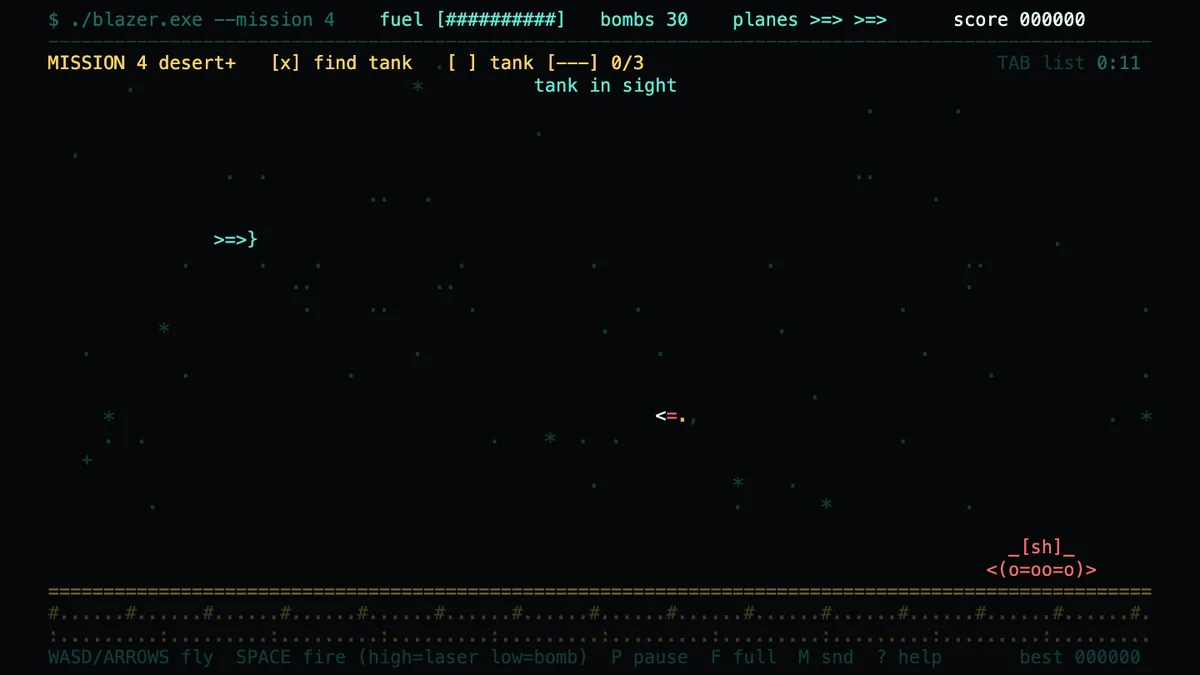
This is not a copy. I wrote it from public descriptions of how this kind of game plays. The code, the art, the names and the numbers are mine. If you want the original, look for a legitimate copy of Star Blazer.
How a game works with no engine
Today you can start from an engine such as Unreal. It gives you drawing, physics, sound and input. Underneath, every game does the same few things. Blazer.exe is two files and about 49 KB, with no library, so you can see all of them.
1. A game is a loop. About 60 times a second, it moves everything a little, then draws one frame, then starts again. The dt value is the time since the last frame, so the game runs at the same speed on a slow or fast screen.
function tick(now) {
  const dt = Math.min(0.05, (now - last) / 1000);
  last = now;
  update(dt);   // move things, check hits
  render();     // draw one frame
  requestAnimationFrame(tick);
}
2. The screen is a grid of characters. Blazer.exe has 100 columns and 30 rows. Drawing means putting a few letters in the right cell, then painting the grid. A plane is >=>}. A laser is --. An explosion is a ring of * and +.
3. Things are boxes. To know if a bomb hit a building, check whether two rectangles overlap. That is the whole idea.
const hit = (a, b) =>
  a.x < b.x + b.w && a.x + a.w > b.x &&
  a.y < b.y + b.h && a.y + a.h > b.y;
4. Feel is a few numbers. Pressing a key adds speed. Drag slows the plane down. A small constant pull makes it sink. I made that pull weaker after playing the game for a while. None of this is hard. It only takes patience to tune.
5. A homing pointer is a few lines of maths. Each frame, the pointer works out the angle to your plane. It turns toward that angle, but only by a limited amount. Then it moves forward. The turn limit is why you can loop around it. A character is about twice as tall as it is wide, so the vertical distance counts double.
const want = Math.atan2((P.y - e.y) * 2, P.x - e.x);
let gap = want - e.ang;               // wrapped to -PI..PI
e.ang += clamp(gap, -1.8 * dt, 1.8 * dt);
e.x += Math.cos(e.ang) * 15.5 * dt;
e.y += Math.sin(e.ang) * 15.5 * dt / 2;
Try it yourself below. Make the turn limit small and the pointer is easy to loop around. Make it large and it is hard to escape.
Interactive · toy
A homing missile in a game is a few lines of maths. Each frame it works out the angle to your plane, turns toward it by at most a turn limit, and moves forward.
- Work out the angle from the pointer to the plane.
- Compare it with the direction the pointer is heading. The difference is the gap.
- Turn toward the plane, but by no more than the turn limit for this frame.
- Move forward. A low turn limit is easy to loop around and shoot. A high one is hard to escape.
6. Random can be repeated. I use a seeded random number generator. Add ?seed=7 to the address and the world is the same every time. That makes bugs easy to repeat and test.
Then and now
The original Apple II used a MOS 6502 chip at about 1 MHz and shipped with 4 KB to 48 KB of memory. Its text screen was 40 columns by 24 lines. I wrote AppleSoft BASIC on mine, which I wrote about in my history as pseudocode. I did not have an engine to download. If I wanted something to move, I wrote the code that moved it.
That habit has stayed with me. I explained it in what the DOS era still teaches me: write the least code that does the job. An engine saves a lot of work, and I would use one for a big game. Knowing the loop underneath makes the engine less of a mystery.
What went wrong when I played it
Playing it showed me problems no reading of the code would have shown:
- I could never catch the tank. It ran to the far right, where my plane could not follow. I kept it inside the plane's reach.
- Dives were unfair. A test robot flew the missions again and again. It kept dying when it dived next to the tank, because the shells left no time to react. The tank now only shoots at planes flying high.
- The plane seemed to explode. When the tank blew up, the mission ended and the plane was no longer drawn, under the big blast. It looked like a crash. The plane now stays on screen and flies on.
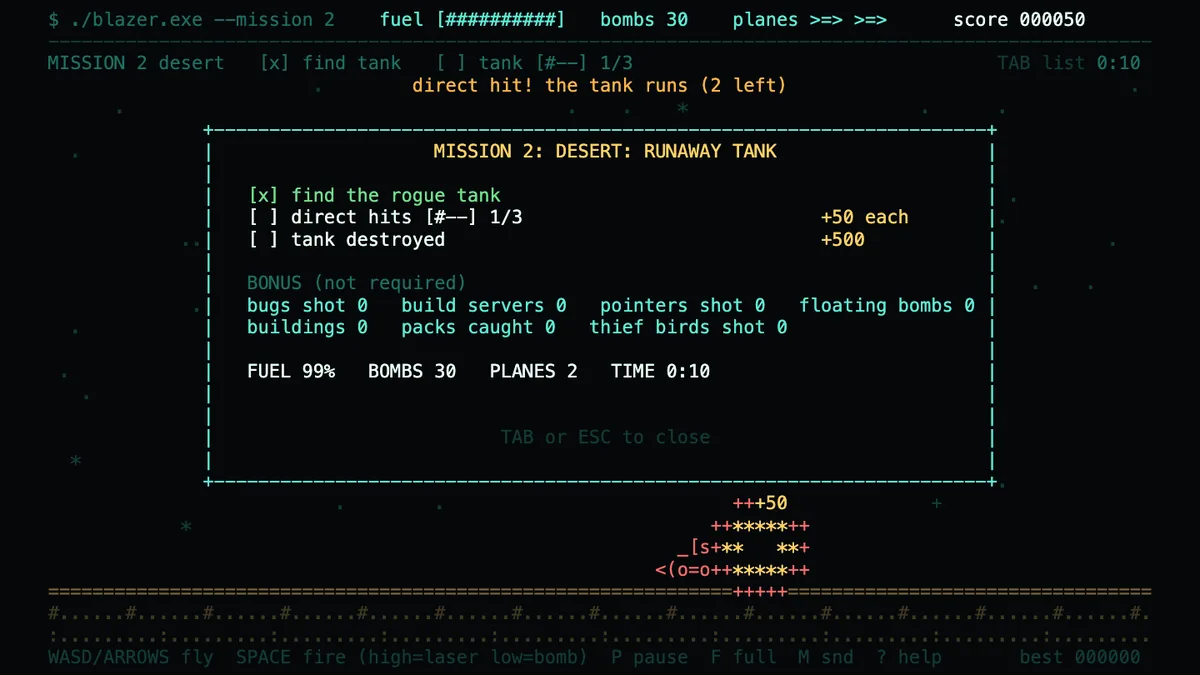
The lesson is to play your own game, and to let a robot play it too. About 100 automated checks run in a real browser each time I change it. They do not tell me if it is fun. Playing does.
What is not done
Touch controls work, but I have tested them only in an emulated phone, not on a real one. Sound is there, and it is off by default. The balance is a first guess, and the last mission is hard on purpose. If something feels unfair, tell me.
Small, careful details like these are what I care about in any product. If you are curious how I build things from idea to handover, read why one engineer, end to end. My other game, Toni Run, has its own note. If you have an idea and are not sure where to start, I am happy to talk it through.
Book a free consult